
Why real-time data improves campaign results for marketers

Real-time data improves campaign results by converting slow, retrospective reporting into immediate signals that cut wasted spend, accelerate optimisation, and compound returns across every channel. Instead of reviewing last week’s numbers and reacting too late, you are watching what is happening right now and acting while it still matters.
The practical impact shows up fast. Mean time to detect (MTTD) operational issues, such as a broken tracking pixel or a failed landing page, can fall from days to minutes, preventing budget draining into a broken funnel. Daily budget reallocation becomes possible rather than weekly or monthly, so spend follows performance in near real time. Partner research suggests that analytics-driven marketing programmes can deliver materially better ROI, with one partner report citing a 57% improvement in 2026, although individual results depend heavily on implementation quality and baseline maturity.
The immediate impacts you will see:
- Broken funnels caught within minutes, not days
- Winning creatives scaled before the opportunity closes
- Underperforming spend paused before it compounds
- Ad-platform algorithms fed fresher conversion signals, improving automated bidding
- Personalisation triggered at the right moment in the customer journey
Table of Contents
- What ‘real-time data’ and ‘real-time analytics’ actually mean in marketing
- The core components of a real-time marketing data system
- How real-time data improves campaign results: the concrete benefits
- What to track: KPIs and dashboards that show real improvement
- How to implement real-time data for campaigns: practical steps
- People, process, and research: making real-time data drive decisions
- Common pitfalls and how to avoid them
- Time to value and investment drivers: what to expect
- Key takeaways
- The gap between real-time data and real-time decisions
- Michaelbell can help you turn live data into campaign results
- Useful sources and further reading
What ‘real-time data’ and ‘real-time analytics’ actually mean in marketing
The phrase “real-time” gets used loosely, and that looseness creates unrealistic expectations. For most marketing teams, real-time in practice means on-demand access to current data that is minutes to a couple of hours old, not a millisecond stream of raw events. That distinction matters because chasing millisecond infrastructure is expensive and, for paid media and email, largely unnecessary.
Three cadences are worth distinguishing:
Real-time (on-demand, minutes to ~2 hours): The practical target for most paid-media, email, and conversion teams. You can check performance at any point and see the current state of your campaigns. Google Ads and Meta Ads Manager operate roughly in this window.
Near-real-time (2–6 hours): Common for server-side event pipelines and attribution platforms. Still fast enough to catch same-day issues and reallocate daily budgets before the day closes.
Batch (daily or longer): Traditional analytics and data warehouse exports. Useful for trend analysis, forecasting, and board reporting, but too slow for active campaign management. A batch-only setup means you are always optimising against yesterday’s reality.
The decisions each cadence suits differ. Pausing a broken ad set or scaling a sudden creative winner needs on-demand or near-real-time data. Quarterly budget planning works fine with batch. The mistake most teams make is using batch data for decisions that need near-real-time signals, and then wondering why their optimisation feels perpetually behind.
The core components of a real-time marketing data system
A working real-time data setup is not a single tool. It is a stack of components that each play a specific role, and a gap in any one of them creates a lag that undermines the whole.
The key layers are:
- Event and data collection: Client-side tags (via Google Tag Manager, for example) or server-side event collection capture user actions. Server-side is increasingly preferred for reliability and consent compliance.
- Ingestion and streaming: Events flow into a processing layer. Tools like Snowplow and Segment (Twilio Segment) sit here, routing events to downstream destinations in near real time.
- Identity stitching and CDP: A Customer Data Platform (CDP) unifies user identities across devices and sessions. Tealium and Segment both offer CDP capabilities. Without this layer, you are optimising against fragmented, incomplete user pictures.
- Real-time conversion sync: Enriched conversion events are pushed back to ad platforms (Google Ads Enhanced Conversions, Meta Conversions API) so their algorithms receive accurate, timely signals. This directly improves algorithmic learning and lowers acquisition costs.
- Analytics and attribution layer: Google Analytics 4 and Adobe Analytics both offer near-real-time reporting. GA4’s event-based model is well-suited to streaming data; Adobe Analytics suits enterprise stacks with complex attribution needs.
- Dashboards and alerting: A live dashboard (Looker Studio, Tableau, or a native platform view) surfaces the signals that matter. Automated alerts for anomalies, such as a sudden CPA spike or a conversion rate drop, are what turn dashboards from passive displays into operational tools.
- Actioning integrations: The loop closes when signals trigger actions, whether that is a budget rule in Google Ads, a suppression list update in your email platform, or a creative swap in a dynamic ad.
Pro Tip: API lag is real. Google Ads data in GA4 can carry a 24–48 hour delay for some attribution models. Always check the data freshness of each source before building decision rules on top of it, and note the lag in your dashboard so your team does not act on stale numbers thinking they are live.
IDC analysis hosted by IBM notes that a majority of enterprise use cases require data processed within minutes to be actionable. For marketing teams, that threshold is achievable with a well-configured server-side pipeline, even without enterprise-scale infrastructure.
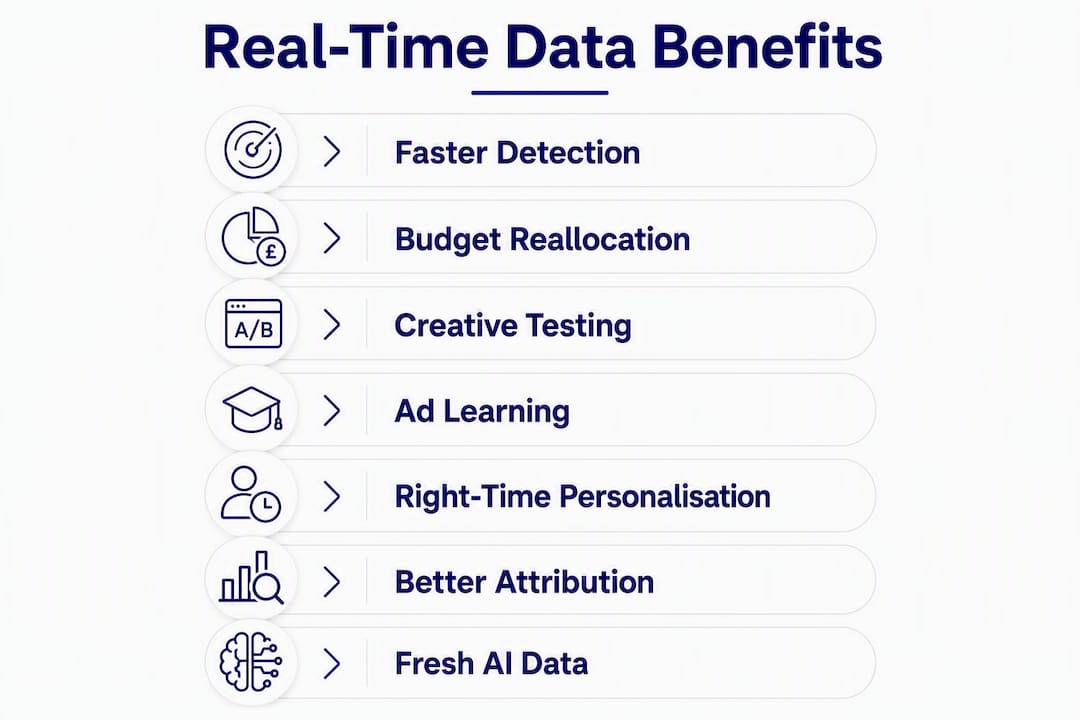
How real-time data improves campaign results: the concrete benefits
This is where the investment pays off. Each benefit below maps to a specific metric and a realistic example of what improvement looks like.
1. Faster anomaly detection
When a tracking pixel breaks, a landing page 404s, or a payment gateway fails, every minute of delay is budget spent on a broken funnel. With live monitoring and automated alerts, MTTD falls from days to minutes. A team running a £50,000 monthly paid search budget that catches a broken conversion tag within 30 minutes loses a fraction of what a team that discovers the issue in the next morning’s report does.
2. Daily budget reallocation
Real-time analytics shifts decision windows from days to hours, making daily budget reallocation possible rather than weekly or monthly. If one campaign is pacing ahead of its CPA target by midday, you can move budget to it before the day closes. Over a month, those daily micro-adjustments compound into meaningfully better ROAS.

3. Accelerated creative testing
Waiting a week to read A/B test results means running a losing creative for seven days. Near-real-time data lets you identify directional signals faster, though statistical significance still requires adequate sample sizes. The practical gain is knowing which creative to prioritise in production and media spend before the campaign window closes.

4. Improved ad-platform learning via conversion sync
Ad platforms like Google and Meta use conversion signals to train their bidding algorithms. Delayed or incomplete conversion data degrades that training. Feeding enriched, timely events via server-side APIs means the algorithm is learning from accurate data, which tends to lower CPA and improve ROAS over the learning phase. Prompt delivery of enriched conversion events directly supports better algorithmic performance.
5. Right-time personalisation
Real-time marketing analytics flips decisions from ‘what happened’ to ‘what is happening’, enabling personalised messages triggered by live behaviour. A cart abandonment email sent within an hour of the event consistently outperforms one sent the following day. The key, as Salesforce’s Martin Kihn frames it, is delivering the relevant experience at the right time rather than reacting to every data tick. Capture immediately; act at the moment that serves the customer.
6. Better attribution and revenue visibility
With near-real-time conversion data flowing across channels, attribution models have more complete, timely inputs. You can see which channels are genuinely driving revenue today, not which ones appeared to last week. That visibility supports confident budget decisions aligned with business goals rather than gut feel.
7. Fresher data for AI and ML models
AI and machine learning models trained on stale data make decisions based on yesterday’s reality. Continuous feeding of up-to-date conversion signals is what keeps automated bidding, predictive audiences, and dynamic creative optimisation performing in fast-moving markets. This is especially relevant as more teams rely on AI-driven marketing strategies to handle optimisation at scale.
What to track: KPIs and dashboards that show real improvement
Knowing which metrics to surface in near real time, and how often to check them, is what separates a useful dashboard from a wall of noise.
Core KPIs to monitor
| Metric | Why it matters | Check frequency |
|---|---|---|
| Cost per acquisition (CPA) | Primary efficiency signal; spikes indicate waste or tracking issues | Daily (alert on >10% deviation) |
| Return on ad spend (ROAS) | Revenue efficiency; guides daily budget reallocation | Daily |
| Conversion rate by funnel stage | Identifies where drop-offs occur; catches broken steps fast | Daily / on alert |
| Mean time to detect (MTTD) | Operational health metric; measures how quickly issues are caught | Per incident |
| Click-through rate (CTR) | Creative fatigue signal; declining CTR flags when to rotate assets | Weekly trend, daily alert |
| Impression frequency | Audience saturation indicator; high frequency with low CVR signals waste | Weekly |
| On-site engagement (scroll depth, time on page) | Qualitative signal for landing page relevance | Weekly |
Dashboard design: morning check vs deep-dive
A morning check view should show yesterday’s CPA and ROAS against target, any active alerts, today’s pacing against daily budget, and conversion volume by channel. Five minutes, clear status.
A deep-dive view adds funnel conversion rates by stage, creative performance by variant, attribution path analysis, and frequency by audience segment. This is a weekly or pre-optimisation session tool, not a daily one.
Pro Tip: Build your alert thresholds around your campaign’s natural variance, not arbitrary percentages. A campaign with a CPA that fluctuates ±30% day-to-day needs a wider alert band than one that is consistently within ±10%. Tight thresholds on volatile campaigns create alert fatigue and train your team to ignore notifications.
How to implement real-time data for campaigns: practical steps
Moving from concept to an operational real-time workflow takes a structured approach. Here is a practical sequence that works for most UK marketing teams.
Step 1: Audit your current data flows
Map every data source, every tag, and every integration. Identify where batch processing is creating lag and where conversion data is incomplete or delayed. This audit is the foundation; without it, you are building on unknown ground.
Step 2: Choose your event collection approach
Server-side event collection is the preferred approach for reliability, data quality, and UK GDPR compliance. Client-side tags remain useful as a fallback but are vulnerable to ad blockers and browser restrictions. Tools like Tealium and Snowplow support server-side collection with strong consent management capabilities.
UK compliance note: Under UK GDPR and ICO guidance, real-time event collection requires a lawful basis, typically consent for marketing purposes. Your consent management platform (CMP) must fire before any marketing tags, and server-side conversion handling must respect consent signals. Review your consent lifecycle regularly, particularly if you are using enhanced conversion APIs that pass hashed personal data to ad platforms.
Step 3: Select your identity stitching and CDP approach
Without identity resolution, the same user appears as multiple anonymous sessions. Segment (Twilio Segment) and Tealium both offer identity stitching and CDP functionality. For smaller teams, GA4’s user-ID feature provides a lighter-touch alternative. The right choice depends on data volume, budget, and the complexity of your customer journey.
Step 4: Enable conversion syncing to ad platforms
Connect your server-side events to Google Ads Enhanced Conversions and Meta Conversions API. This closes the loop between on-site behaviour and platform algorithms, improving bidding performance and giving you more accurate attribution data.
Step 5: Build dashboards and automated alerts
Use Looker Studio, Tableau, or your analytics platform’s native dashboarding to build the morning-check and deep-dive views described above. Set alerts for CPA spikes, conversion rate drops, and pacing anomalies. Connect alerts to Slack or email so the right person sees them immediately.
Step 6: Embed governance and a daily review ritual
A live dashboard without a process to act on it is just decoration. Assign clear ownership of daily checks, define approval thresholds for budget changes, and document a launch-day playbook for new campaigns. Internal alignment on how to act on live data is as important as the technical setup.
Pro Tip: Start with Google Analytics 4 and your ad platform’s native real-time reporting before investing in a full CDP. GA4 is free, event-based, and integrates directly with Google Ads. It gives most teams 80% of the near-real-time visibility they need at zero incremental cost.
People, process, and research: making real-time data drive decisions
Technology alone does not improve campaign results. The MIT Sloan Management Review’s research on real-time businesses identifies a critical pattern: the organisations that outperform their competitors are not simply those with the fastest data pipelines, but those with trusted data, empowered employees, and genuine business agility. Speed without trust in the data, or without the authority to act on it, produces noise-chasing rather than optimisation.
The practical implication is that your 30/60/90-day implementation plan needs as much focus on people and process as on tooling:
Days 1–30 (foundation):
- Complete the data audit and identify the two or three highest-value signals to surface first
- Assign a named owner for the daily dashboard check
- Define what constitutes an alert-worthy anomaly for your top three campaigns
- Document a simple launch-day playbook: what to check in the first four hours, who approves a budget pause, and what the escalation path looks like
Days 31–60 (activation):
- Enable server-side conversion syncing to your primary ad platforms
- Build the morning-check dashboard and test alerts in a live campaign
- Run a team session on reading near-real-time data without over-reacting to early noise
- Establish a weekly optimisation ritual: review, decide, document
Days 61–90 (optimisation):
- Review MTTD for any issues caught during the period; set a target for the next quarter
- Assess whether daily budget reallocation is producing measurable ROAS improvement
- Identify the next layer of the stack to add (CDP, enhanced attribution, or creative performance tracking)
At Michaelbell, we have seen this pattern play out with clients across sectors. A retail client running multi-channel campaigns had all the right tools in place but no daily review process. Conversion data was available in near real time, but budget decisions were still made weekly. Introducing a structured daily pacing review, with clear approval rules for same-day budget shifts, produced a measurable reduction in wasted spend within the first month, without any change to the underlying technology. The data was always there; the process to act on it was not. Understanding your customer journey in real time only creates value when your team is set up to respond.
Common pitfalls and how to avoid them
Real-time data creates as many opportunities to make bad decisions quickly as it does to make good ones. These are the mistakes we see most often.
Reacting to early noise: The first 24–48 hours of a new campaign are statistically unreliable. CPA will often look terrible before the algorithm finds its footing. Acting on day-one data by pausing campaigns or cutting budgets interrupts the learning phase and produces worse outcomes than patience would have.
Acting on incomplete conversion signals: If your conversion tracking has a 48-hour attribution window and you are making decisions at hour 12, you are optimising against roughly half the data. Always know your attribution window before setting decision thresholds.
Ignoring attribution windows: Last-click attribution in a near-real-time dashboard will consistently undervalue upper-funnel channels. A display campaign that looks like it is producing zero conversions in real time may be contributing significantly to assisted conversions that only appear days later.
Over-automating without guardrails: Automated budget rules and bidding strategies are powerful, but they need manual review thresholds. An automated rule that pauses any ad set with a CPA above £X can fire on a single bad hour and kill a campaign that was performing well overall.
Pro Tip: For any automated rule, add a minimum impression or click threshold before it can fire. A rule that requires at least 50 clicks before pausing an ad set will not trigger on statistical noise. This single guardrail prevents the majority of reactive automation mistakes.
Alert fatigue: Too many alerts, set too tightly, train your team to ignore them. Prioritise alerts for the signals that require immediate action (broken tracking, catastrophic CPA spikes) and move trend monitoring to the weekly deep-dive.
Behaviour-triggered messaging without prepared content: Real-time marketing requires fast data, prepared templates, and empowered teams. Triggering a cart abandonment flow without a tested, approved email template, or without a clear suppression rule for recent purchasers, creates intrusive experiences that damage brand trust rather than recover revenue.
Time to value and investment drivers: what to expect
Setting realistic expectations is part of getting buy-in. Here is what the typical implementation timeline looks like, and where the costs sit.
Implementation timeline
| Phase | Timeframe | What it delivers |
|---|---|---|
| Quick wins (GA4 + alerts) | Weeks 1–4 | Near-real-time campaign visibility, basic anomaly alerts, conversion sync to primary ad platform |
| Platform integration | Weeks 4–6 | Server-side event collection live, enhanced conversions active, morning-check dashboard built |
| CDP and identity stitching | Months 2–4 | Unified user profiles, cross-channel attribution improvement, personalisation triggers active |
| Full operational readiness | Months 4–6 | Daily review rituals embedded, automated rules with guardrails, MTTD target achieved |
Cost drivers
The investment varies significantly depending on your starting point:
- Data engineering: Server-side tagging and pipeline work is typically the largest single cost for teams without existing infrastructure. Complexity scales with the number of data sources and destinations.
- CDP and platform licences: Segment and Tealium both carry licence fees that scale with data volume and feature tier. GA4 is free; Adobe Analytics is enterprise-priced.
- Dashboarding: Looker Studio is free and connects to GA4 and most ad platforms natively. Tableau and Power BI carry licence costs but offer more flexibility for complex data models.
- Integration work: Connecting conversion APIs, identity resolution, and alerting systems requires development time, whether in-house or via an agency.
- Ongoing maintenance: Data pipelines need monitoring. Budget for ongoing oversight, particularly around consent management and platform API changes.
A worked illustration: a team spending £30,000 per month on paid media that catches a broken conversion tag two days earlier than before, preventing two days of misdirected spend, recovers roughly £2,000 in a single incident. A well-configured real-time setup typically prevents multiple such incidents per quarter, making the implementation cost straightforward to justify against avoided waste alone. Reallocating spend to higher-performing channels compounds that return further.
Key takeaways
Real-time data improves campaign results by turning passive reporting into active optimisation, with the biggest gains coming from faster anomaly detection, daily budget reallocation, and fresher conversion signals for ad-platform algorithms.
| Point | Details |
|---|---|
| Start with detection speed | Reducing MTTD from days to minutes prevents budget draining into broken funnels. |
| Enable conversion sync first | Feeding enriched, timely events to ad platforms improves algorithmic learning and lowers CPA. |
| Build process alongside technology | Trusted data plus empowered teams drives results; dashboards without daily review rituals add no value. |
| Use near-real-time, not millisecond streaming | On-demand data updated every few minutes to hours is sufficient for most paid-media decisions and far more cost-effective. |
| Michaelbell as your implementation partner | Michaelbell helps marketing teams build the data workflows, dashboards, and daily processes that turn live signals into better campaign outcomes. |
The gap between real-time data and real-time decisions
Most articles about real-time analytics focus on the technology. The tooling section, the stack diagram, the list of platforms. That is useful, but it misses the harder problem.
The real bottleneck is almost never the data. By the time a team is asking about real-time analytics, they usually have access to near-real-time signals already, whether through GA4, their ad platform dashboards, or a basic Looker Studio view. What they lack is the organisational permission and process to act on those signals quickly.
Budget approval processes that require a weekly sign-off cycle make daily reallocation impossible regardless of how live your data is. Creative teams without a rapid-iteration workflow cannot swap an underperforming ad in time to matter. And marketing managers who have been burned by reacting to early noise, and then watching a campaign recover, learn to distrust the very signals they should be reading.
The teams that get the most from real-time data are not the ones with the most sophisticated stacks. They are the ones that have done the unglamorous work of defining what an alert-worthy signal looks like, who is authorised to act on it, and what the approved response options are. That is an organisational design problem, not a technology problem.
The technology is the easy part. The process is where the value lives.
Michaelbell can help you turn live data into campaign results
Real-time data is only as useful as the strategy and process built around it. Michaelbell works with marketing teams as an embedded agency partner, handling everything from data audit and conversion tracking architecture to dashboard design, campaign execution, and the daily optimisation process that makes live signals count.
Our scope covers the full picture: GA4 and server-side event setup, conversion API integration, CDP guidance, dashboard and alerting builds, and the playbooks your team needs to act confidently on near-real-time data. We also bring UK GDPR and ICO compliance into every data implementation, so your real-time setup is built on solid legal ground from day one.
If you want a partner who feels like part of your team rather than an outside vendor, see what Michaelbell offers and get in touch. We will get straight back to you.
Useful sources and further reading
A curated list of the sources and tools referenced in this article, plus additional reading for teams ready to go deeper.
- Real-time data (IBM Think) — Research and analysis on data freshness requirements and AI model performance. Authoritative vendor research.
- Build Business Advantage With Real-Time Decision-Making (MIT Sloan Management Review) — Academic research on the four capabilities that distinguish real-time businesses. Highest-authority source in this article.
- What is real-time marketing? (Salesforce) — Martin Kihn’s framing of ‘right-time’ vs real-time; practical perspective on triggered marketing. Vendor commentary.
- ICO guidance on UK GDPR — Primary source for UK data protection obligations relevant to real-time event collection and consent management. Regulatory authority.
- Leverage customer data for brand communications (Michaelbell) — Michaelbell’s perspective on using reliable data to drive confident creative and campaign decisions. Agency resource.